The page your customers use
Your customers send a request, read every reply, and see where it has got to. There is nothing for them to learn and nothing for them to install.
Sending a request
A form on a page. You decide what it asks for, and help articles are offered while the customer is still typing.
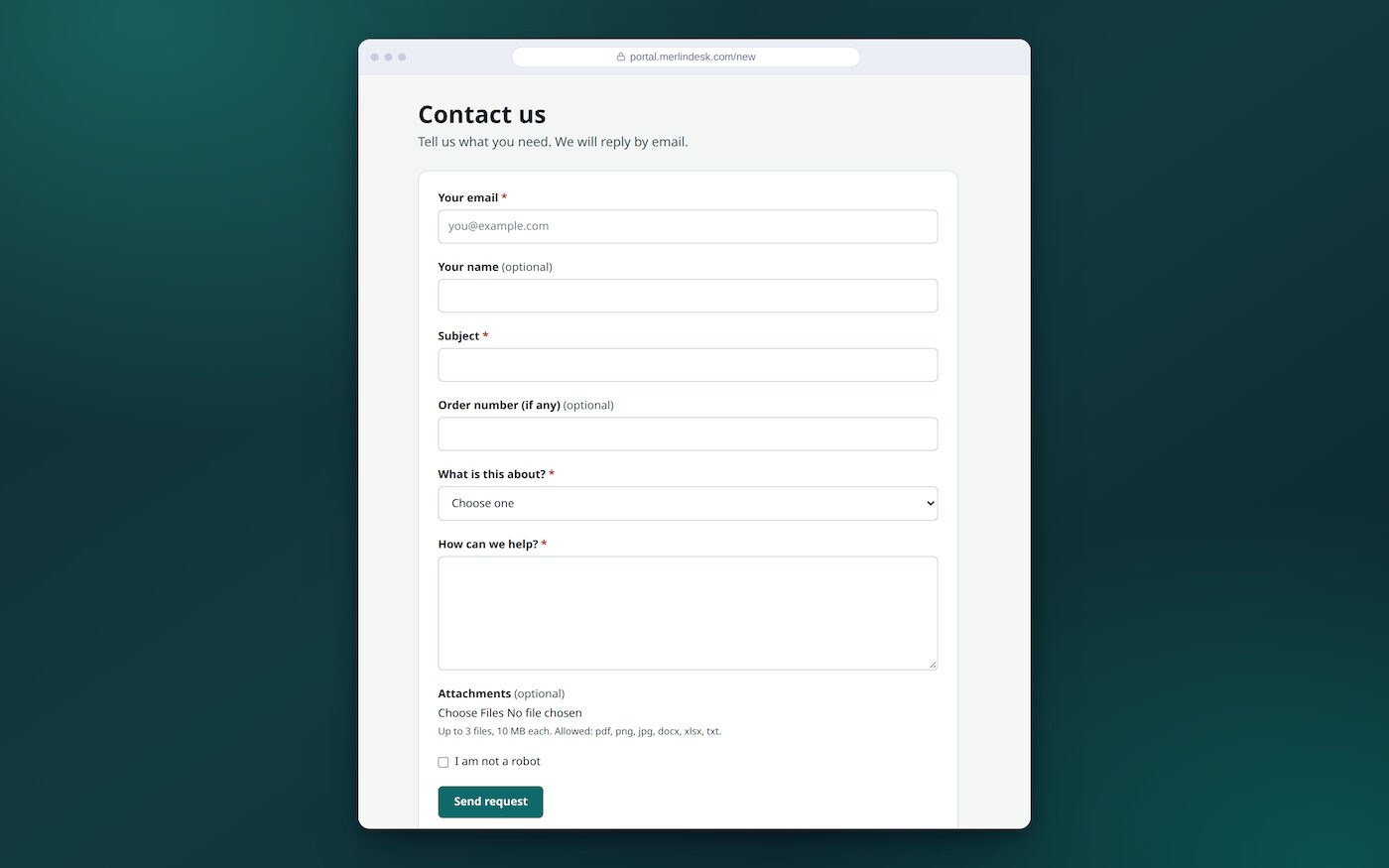
- Your own questions on the formOrder number, model, branch — whatever you need to know
- Questions they must answerSo nothing arrives half filled in
- Files attachedYou set the biggest size and which file types are allowed
- A thank-you page with the numberSo the customer has something to quote back to you
- More than one formThey pick from a list, or you send a link straight to one form
- Help articles while they typeSuggested before the request is sent, so some are never sent at all
- The form in their languageWording in English, Hindi, Tamil, Marathi or Bengali
- A menu of things to ask forA list of services people can request, for IT and office teams
Every past request, and every reply
No more "what happened to my email". The customer opens the page and reads the whole thing themselves.
- All their requests in one listWith search and filters
- Their company's requests tooSwitch it on and a customer sees everyone's at their company
- The whole conversationEvery reply, in order, on the request
- Reply, and attach a fileThe reply lands back in your team's list
- Download what you sentAny file on the request
- Solved, closed, or open againA reply to a closed request opens it again
- Take a copy of the listExport their own requests as a file
- A score when it is doneThey rate the solved request from the link on it
- Your words for the stateShow the customer-facing status name you chose, or hide states entirely
Signing in with a code, or not signing in at all
Most people do not want another password. You choose how your customers get in, and whether they have to at all.
- A code sent to their emailThey type the code, or open the link in the same email. There is no password to forget or reset
- No account at allLet anyone write in through the form without signing up
- Or let them register themselvesThey confirm their email address, and you can limit it to your customers' email domains
- Invite a customerSend an invite by email, and cancel it if you change your mind
- Google, Microsoft or a work accountNeeds an identity provider connected first, and there is no screen in the product to manage it
- Choose who may open the pageAnyone, signed-in customers only, or one company's own sign-in only
- Read a reply without signing inA private link in the reply email, which stops working after a time you set
- Pick which methods you offerTurn each way of signing in on or off
The code arrives by email, so you need a mail account. Sign-in by code, the invite email, the registration confirmation and the private reply links all go out through your own mail provider once it is connected. On our demo no mail is sent at all — the code is written to the server log instead — so sign-in by code is not something you can try there. Ask us and we will show you on a workspace with mail connected.
A place where customers answer each other
A community on the same page. Someone asks, someone else answers, and the person who asked marks the reply that solved it.
- Areas for different subjectsEach one open to everyone, to signed-in customers, to one company, or to a group you pick
- Start a topic, or reply to oneWith search across everything already asked
- The best answer, markedThe person who asked picks the reply that solved it, and the topic shows as answered
- Your team can mark it tooAnd pin a topic, lock it, or filter by open, answered and locked
- Post under a nicknameCustomers do not have to show their real name
- Nothing appears until you say soFirst post of a new member waits, every post waits, check after posting, or no checking
- Junk held backScored on links, shouting, repeated letters, a word list you keep, and how new the member is. Plain rules, not machine learning
- A limit on how fast one person can postPer member, per hour
- Badges for the helpful onesGiven by hand or by a rule
- Block a memberAnd see every member with their post count
- Turn a topic into a requestOne that needs real support becomes a ticket for its author, who is told by email
Their plan, their orders, and your status page
Three pages that stop people writing in to ask. Use the ones that fit your business.
- What you promised themTheir reply and fix times, and the time left on each open request
- Their ordersThey enter their email and a code to see them. This reads from your shop, which has to be connected first
- A public status pageWhat is working now, what maintenance is planned, and what went wrong before
- Tell me when it changesVisitors subscribe by email and confirm. Sending needs your own mail account connected
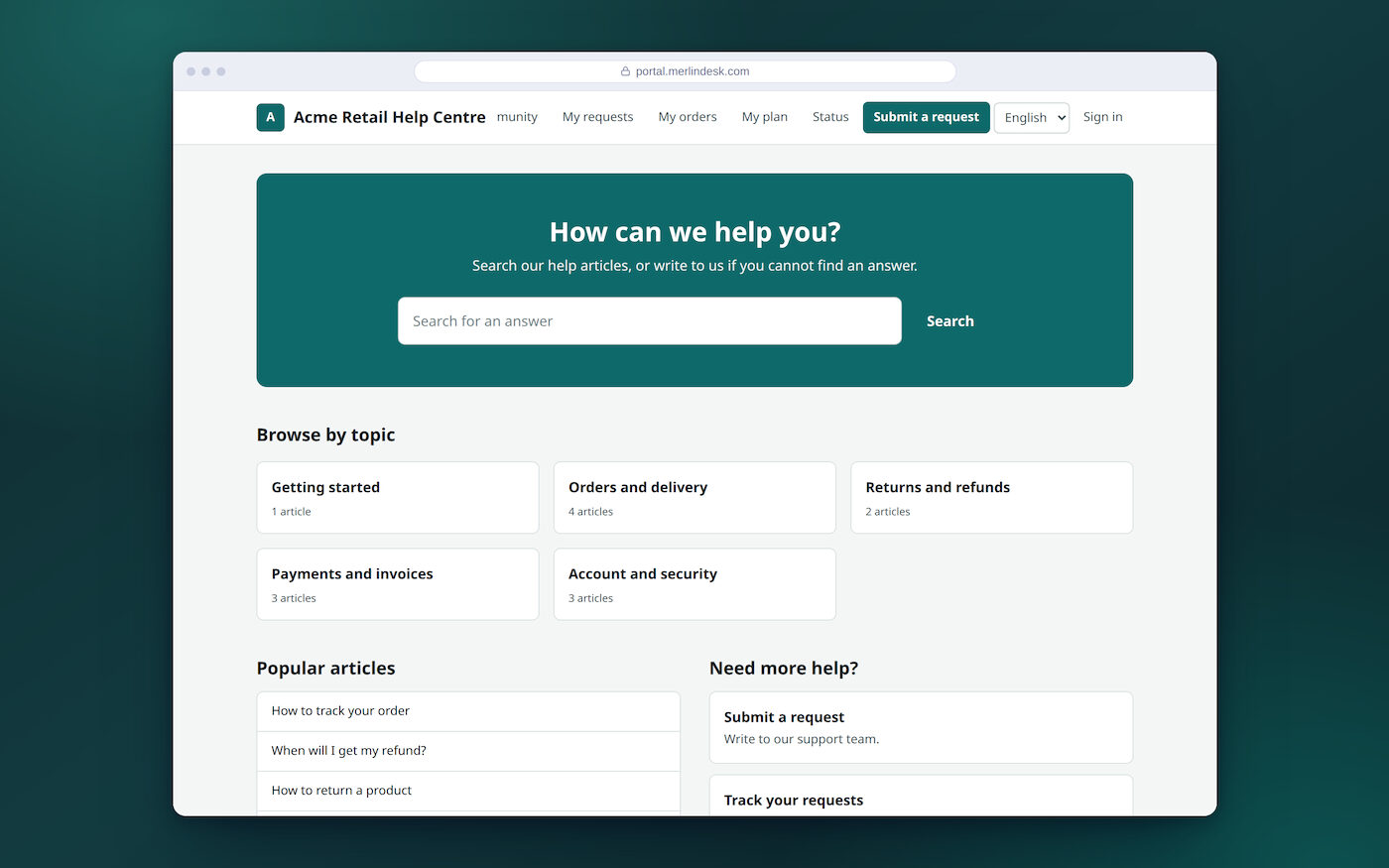
Our own demo customer page is at portal.merlindesk.com. The help page, the community and the status page are all open there. The order list runs on sample orders and a fixed code on the demo, so treat that one as a sketch.
Your client's name and colour, and what we cannot do yet
If you run support for other businesses, each client's page carries their name and their colour, not ours. That much is real today. The rest of it is not, and you should know before you sell it.
- The client's name on the pageIn the header, the browser tab and the footer
- The client's colourButtons, links and the mark in the header take it
- Their languagesWhich languages appear, and which one is the default
- A message on every pageA banner you write, on or off
- Cookie noticeAnd a Google Analytics ID loaded only after the visitor agrees
- More than one portalYou can add another by name. There is no separate branding screen for each one yet
- Write the home page yourselfYour own HTML and layout for the portal home page, with a preview that strips anything unsafe
Being straight about branding. The client's name and colour do carry through to every page. Three things do not. A client's logo cannot be uploaded — there is no screen for it — so the page shows the first letter of the client's name in their colour instead. "Powered by MerlinDesk" sits at the bottom of the help page and there is no way to take it off. A client's own web address can be typed in and checked, but it does not work on this hosting, so each client uses an address we give them.
The chat box you paste into a client's website is the exception: there you can upload a logo and hide our name today. The three above are being built. We would rather tell you now than have you find out after you have promised it to a client.