The same system, for your own IT desk
Most help desks handle customers only, so IT companies end up paying for a second tool. This one does both. Faults and outages, who is on duty, planned changes, your equipment, and a menu of things staff can ask for — in the account you already have.
Some people search for this as ITSM, or IT service management.
Faults and outages
When something is down, you open a fault. It holds how serious it is, who is dealing with it, what you have tried, and what you told people.
- How serious it is, from P1 to P4With the service affected, who is in charge, and what is wrong
- Start from a saved templateOpening wording, how serious, and whether it counts as a major one
- Open it as a draft firstSomeone confirms it before it goes live, so a mistake is not announced
- Raise it to major, with a reasonThe reason is kept with the record
- Steps from open to closedInvestigating, cause found, watching, fixed, closed
- Add the people working on itEach with a label saying what they are doing
- A timeline of what happenedEach entry can stay internal, go to the people affected, or go on the status page
- Linked to the request and the alertsSo the customer ticket and the monitoring alert sit with the fault
- A write-up afterwardsWith follow-up jobs, an owner for each one, and a tick when it is done
- One list of what needs attention nowWith the on-duty rota beside it
- Learn from the patternWhich services break most, which alerts are noisy, which faults never got a write-up, and which follow-up jobs are late
- A warning when requests suddenly jumpIt compares the last hour with the usual level for that hour, and can start a draft fault. It is a comparison, not AI.
- A first draft of the write-up, and a list of likely causesThe causes list also looks at what was released in the last day. Both need your own AI provider and are not switched on for the demo.
- Export one fault's full recordFor a customer, an insurer or your own files
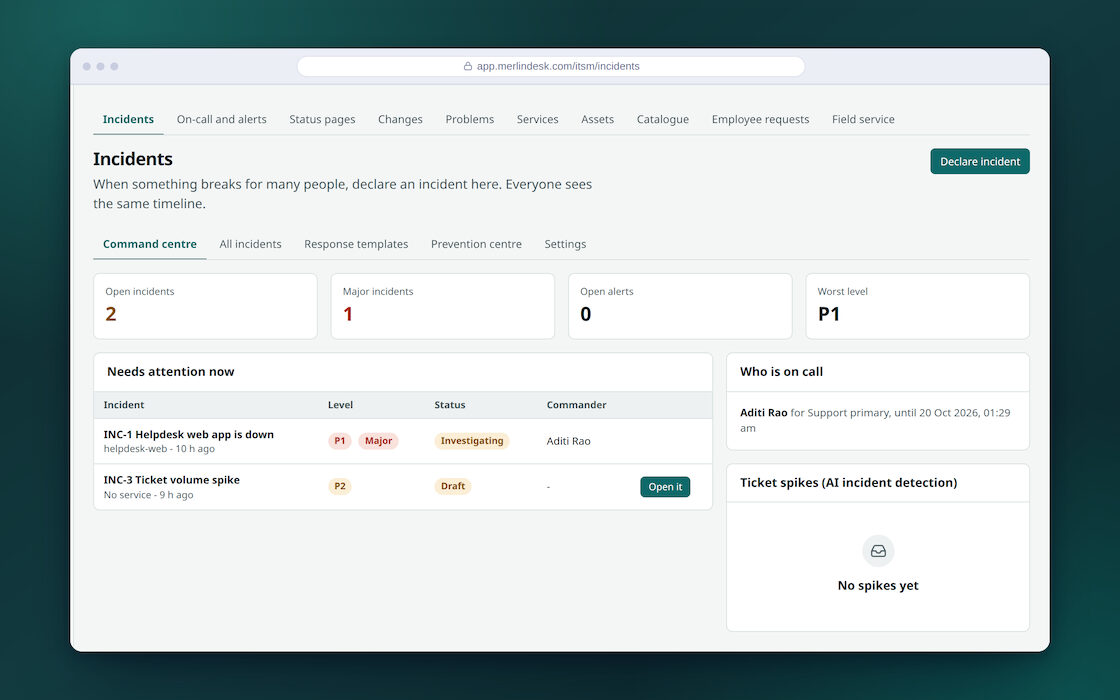
Who is on duty, and who gets told next
- Rotas: daily, weekly or hours you setEach with its own time zone
- Who is on now, and the shifts coming upEveryone can also see their own next shifts
- A one-off swapFor a holiday or a sick day, without redoing the rota
- Who to tell, and who after thatSteps, the wait between them, how long to wait for an answer, and how many times to repeat
- Answering stops the chainOnce someone takes it, nobody else is chased
- Alerts in from your monitoringEach source gets its own secret web address, with a limit on how many it will accept
- Label the sourcePrometheus, Zabbix, Grafana, CloudWatch, email or plain. One reader handles them all, so the label is only a label.
- Match their fields to oursTitle, how serious, service, status, and the key used to spot repeats
- Join up repeat alertsAnd notice a storm when the count passes a number you set
- Accept an alert, close it, or turn it into a fault
- Send alerts to the right rotaBy how serious, the service, words in the title, or where it came from
- Quiet during planned workAlerts are held back, and the work can be announced on the status page
- Notice a job that stops reporting inEach job gets an address to check in to. Silence raises an alert.
- A record of every alert sent outWhich you can export
Being straight about waking people up. The rotas, the steps, the waiting and the answering all work. The sending depends on what you connect: messages to the phone app need your own push account, and text messages need your own SMS provider.
A phone call cannot be made on this build. If you set a voice call as a step, the system writes it down and reports that it worked, but nobody is rung. So do not plan on being phoned at three in the morning. Use the phone app or text messages for that, and treat the voice step as not there.
Find the cause, and write down the workaround
A fault is today's outage. A problem is the thing behind it that keeps coming back.
- Log the problemHow urgent it is, the cause, the workaround, and the requests it explains
- Move it through its stepsFrom found, to a cause, to closed
- A known fault your team can seeThe workaround shows up for whoever answers the next person who asks
- Link requests to it, and unlink themYou can see how many people this one problem affected
- Export the list as a spreadsheet
Planned changes, with sign-off
Write down what you are going to do, who agreed, and how you would undo it.
- Three kinds of changeStandard, normal and emergency, each tied to a service
- The plan, and the plan for going backPlus a link to anything longer
- A score for how risky it isFrom a questionnaire you set up, with the reasoning shown. It is a questionnaire, not a prediction.
- Send it for sign-offNamed approvers, a separate list for emergencies, and either all of them must agree or any one of them
- Approve or refuse itAnd record how it actually went
- Templates for the changes you make oftenAnd they can be agreed in advance, so routine work is not held up
- Windows when work may happen, and dates when it may not
- A warning when two changes clashOr when one falls in a period where no work is allowed
- A change calendar you can subscribe toIt opens in your own calendar app through a signed link
- Group changes into a releaseAnd keep a record of what was deployed
- Ask whether it is safe to deploy nowIt warns you, or blocks it, depending on how you set it up
- Export changes as a spreadsheet
- Which standard IT process names match which partA list that maps the ITIL names onto the screens here. It is a name map, not a certification.
A menu of things staff can ask for
Instead of emailing IT, people pick from a list. Everyone then knows what was asked for and who has to agree to it.
- Categories and items you writeEach with who may see it, who deals with it, a price or a how-long note, and words to search by
- Staff send a request and watch itAnd cancel it if they change their mind
- Sign-off where you need itAn approver sees everything waiting for them in one place
- Your customers can use a menu tooFrom the customer page, once they are signed in
- Track each request to doneStart it, fulfil it, or cancel it
- Joiners, leavers and office movesOne template makes all the jobs at once, across IT, HR and facilities, each with a team, an owner and a date
- Tick the jobs off as they are doneThese are checklists. They do not create accounts or hand out equipment by themselves.
- Back-office requestsInternal work that did not come from a customer still gets a record
Your computers, equipment and stockrooms
A list of what you own, who has it, what it cost, and what it is worth now.
- Your own kinds of equipment, with your own fieldsA laptop can carry the operating system and memory it has; a phone its IMEI
- Everything about one itemTag, serial number, barcode, status, how critical it is, cost, when it was bought, and when the warranty and lease end
- Who has it, and where it livesGiven to a person or sitting in a stockroom, with a history of every change
- Change or delete many at once
- Scan a barcode or QR code to find itOr type the number in
- Print labels as a PDF
- What it is worth nowWorked out month by month from the cost and the life you set
- Warranties and leases ending in 90 daysFlagged before they run out
- What depends on whatLink items to each other and see the map, with direction and depth
- Bring the list in from the tools you already useJamf, Intune, Lansweeper, i-doit or a pasted spreadsheet, matched up by serial number. It reads their inventory; it does not scan your network. Each one needs its address and a key.
- See what each sync didFound, created, updated, skipped and failed
- Stockrooms with levels and a low markSee what is running low before you run out
- Stock in and outWith the recent moves listed
- A list of your services, each with an ownerPlus what it depends on. A loop is refused.
- What breaks if this breaksIt follows the chain of what depends on it, as deep as you ask
- Export the lot as a spreadsheet
There is no licence or renewal tracking. The demo data includes a "software licence" kind of item, and you can type a number of seats and a renewal date on it. Nothing counts seats used against seats bought, gives a seat to a named person, or reminds you before a renewal. Only warranty and lease dates raise a warning.
So use this for hardware, and keep your software licences wherever you keep them today. We would rather tell you now than have you find it out in month two.
A status page for your users
Tell people something is down before they queue up to tell you.
- List the parts of your servicePlus an introduction and a legal note
- Choose who can see itEveryone, or only the people you let in
- Post a notice about a fault or planned workWith a status, start and end times, and a preview before it goes out
- Publish it and tell the people who asked to hearEmailing them needs your own email provider, so it is off on the demo. Notices pushed to other systems are only written to a log on this build.
- Manage and export the list of subscribersWith a confirmation email first, if you want one
- Updates from a fault can go straight onSo the timeline and the public page do not drift apart