Keep track of every customer request
Every question becomes a ticket with a number. You can see who it is from, how old it is, who is working on it and everything that was said before. This page goes through the ticket list and an ordinary working day in it, in detail.
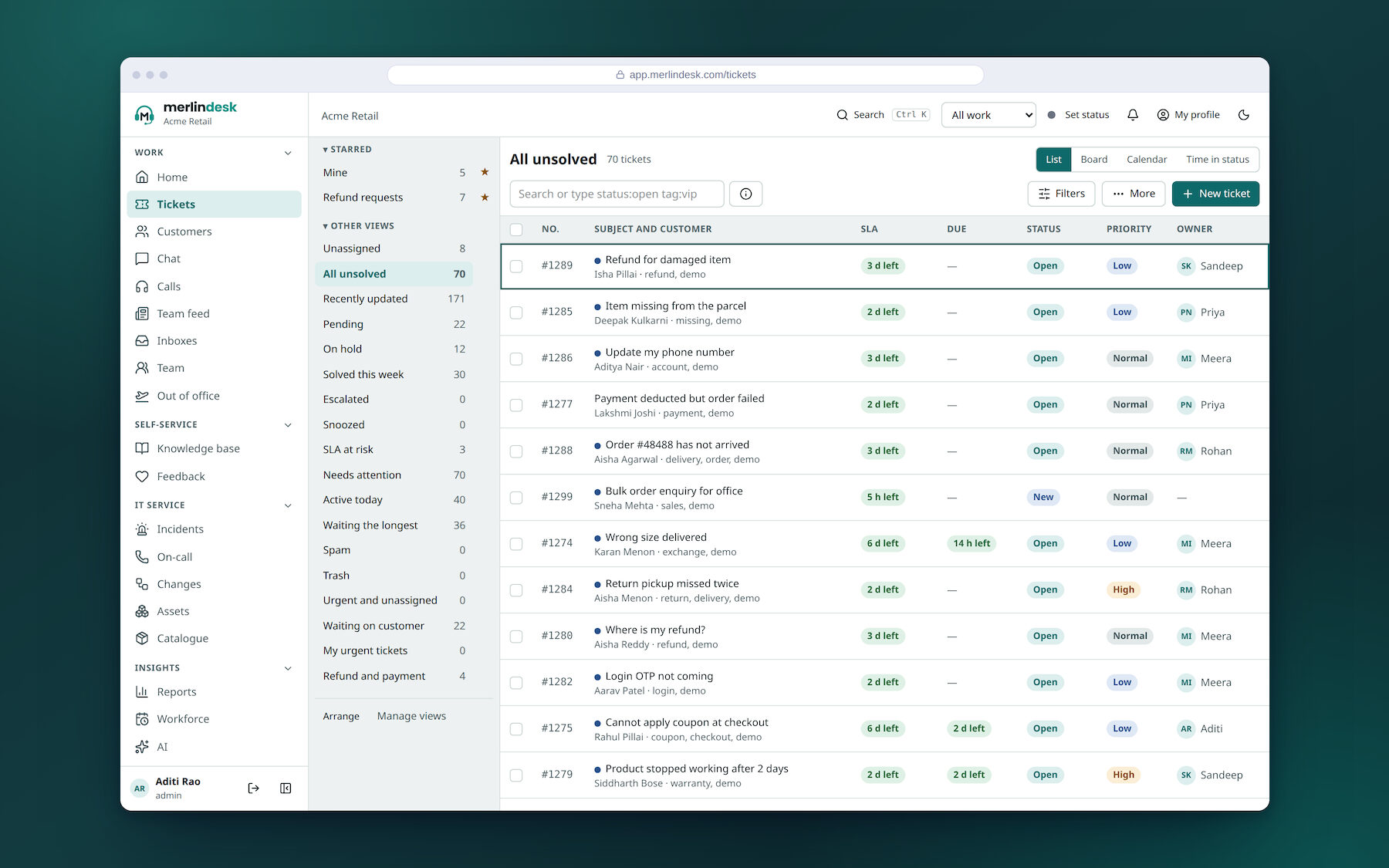
One list of everything that is open
The list is the screen your team sits in all day. Filter it however you like, then keep the filter as a list you can click on tomorrow.
- Filter on anythingStatus, priority, tag, customer, age, team, owner, one of your own fields, or any mix of them
- Save the filter as a listKeep it to yourself or share it with the team, and drag the lists into the order you want
- Lists that are there from the startUnassigned, all unsolved, waiting the longest, pending, snoozed, spam and trash
- A live count beside each oneYou can see what is piling up without opening it
- Four ways to look at the same listA plain list, a board, a calendar, or how long each ticket has sat in its present state
- Board columns you chooseBy status, priority, owner or tag, with lanes across and a limit on how many may sit in one column
- Drag a card to another columnWhich changes the ticket itself
- Pick the columns and their orderEach person sets their own
- Hand a list to a colleague while you are awayWith a date it goes back
- One list for one customerEverything open for a person or a company, in one place
- Team inboxesEach with the status new tickets start in
- Work it from the keyboardSingle keys move you down the list, open a reply, add a note, close a ticket
- Open a ticket by typing its number
- Mark one unread for yourselfAn unread dot stays on the list until you come back to it
Inside one request
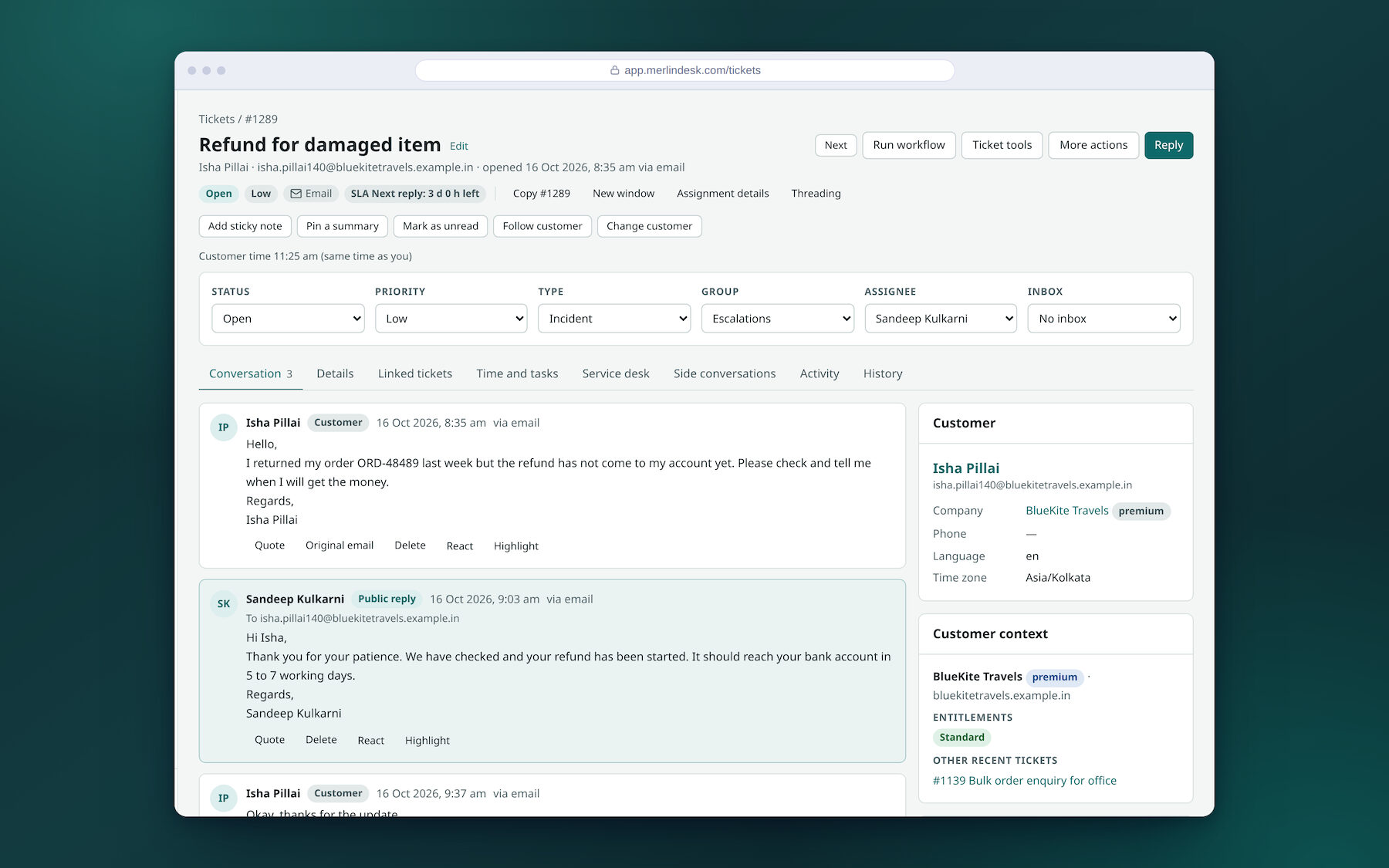
One page holds the whole conversation, with the customer beside it. Across the top sit the six things that say where it stands: status, priority, type, group, assignee and inbox.
- A public reply, or a note only your team seesTwo tabs on the same box. The note is never sent to the customer
- Cc, Bcc and attachments on a reply
- Set the status as you sendAnswer and close in one action
- Undo sendUp to thirty seconds, and you set how long
- Write now, send laterWith "do not send it if the customer writes again first"
- A check before it goesIt warns you about a missing attachment, or a fill-in you left unfilled
- Edit a message you already sentYou type a reason, and the earlier wording is kept
- Read the original emailThe raw message behind any reply, as it arrived
- Quote an earlier message into your answer
- Name a workmate in a noteStart typing and pick them from the list
- Sticky notes, and one pinned summarySo the next person picks the ticket up knowing where it got to
- Hide signatures and quoted historyWith a control to show the full email when you need it
- React to a message, or highlight a line in it
- An activity tab and a full historyEvery change, who made it, and when
- The customer beside the reply boxTheir company, phone, language, their other tickets, and their local time with a marker when it is night there
- Change the customer on a ticketTo someone already on file, or to a new contact
When two of you are on the same request
Two people answering the same customer is the oldest problem in support. The ticket tells you what everyone else is doing before you start typing.
- See who else is on itWho is reading it, who is replying, who is typing at this moment
- A warning if the ticket changed while you wroteYou can set it to stop the send instead of warning
- Your draft saves itselfAnd you are told if you changed the same draft in another window
- Show a draft to someone before it goesThey approve it, or send it back asking for changes
- An owner, and extra ownersSo a second person is formally on it, not just watching
- Follow a ticket, or put a workmate on it as a follower
- Follow a customerYou then see everything that customer sends in
- Add people to Cc on the ticket itselfNot only on one reply
- A private thread for a few teammatesOpened and closed inside the ticket, out of the customer's view
- A feed of what each teammate has been doing
Saved replies, and saved replies that do the work too
The same twenty answers cover most of the week. Write each one once. Some of them can set the ticket up as well as answer it.
- A shortcut you typeThe answer drops into the box with the customer's name and the ticket's details already filled in
- Shared with the team, or just yours
- Folders and favouritesSo the list is still usable when there are hundreds
- Import a set from a fileAnd export them to move them somewhere else
- Saved replies that change the ticket as wellUp to fifteen kinds of action in one: status, owner, tags, fields, due date, snooze, a note, a checklist, a move to another inbox. Other help desks call these macros
- See what it will do before it does itA preview lists every change it is about to make, and then you say go
- Questions inside the replyIt stops and asks you for the missing detail — the order number, the refund amount — and drops your answer in
- Choose what happens when it has runStay on the ticket, or move to the next one
- Raise a ticket on a repeatDaily, weekly or monthly, from a template, for work you do anyway
Merging, splitting, and changing a hundred at once
A pile builds up after a bad week, or an outage brings the same question in forty times. Everything here can be done to a whole selection, and the big one can be undone.
- Change everything you tickedAssign, set status or priority, tag, merge, delete or restore, in one go
- Undo the whole batchOne button, after the fact
- Reply to many tickets at onceAs a public reply, or as an internal note
- Join duplicatesBoth histories are kept, and you have twenty-four hours to undo it
- A banner when it looks like a duplicateMerge it or ignore it. It is matched on words in the subject and the same customer, not by a trained model
- Split messages out into their own ticketFor when one email turns out to be two problems
- Copy a ticket, with or without its messages
- Raise a follow-up from a finished ticket
- Link tickets togetherAs related, or as a parent with children under it
- One update to everyone on a group of linked ticketsSay the outage is over once, to all of them, and retry the ones that failed
- SnoozeUntil a date and time, or until the customer writes back
- Mark it spamAnd block that sender at the same time, if you want
- Trash, restore, or delete for goodDeleting for good depends on your role
- Leave a ticket out of the reportsWith a reason, so a test ticket does not spoil your numbers
Bringing in people outside your team
Plenty of answers depend on a supplier, a courier or a contractor. You can reach them without leaving the ticket, and without giving them your whole help desk.
- Ask a supplier by email, inside the ticketA side conversation keeps its own reply thread, alongside the customer's one, and the customer never sees it
- Invite an outside helperAt one of three levels: look only, add notes, or a light account of their own
- A read-only link that runs outThey open the ticket in a browser with no account. Internal notes are left out unless you include them
- Switch every share link off at once
- Print it, or save it as a PDF
- Mirror a ticket into another team's inboxBoth teams see it, in their own list
- Keep a list of people to keep informedAnd send that whole group one update
Time, tasks and sign-off
If you bill for support, or if a request has to be done in a set order, the ticket carries that too.
- A timer on the ticketStart it, stop it, or type the minutes in afterwards
- One summary of time across tickets
- Mark the work billableAgainst a rate card, and lock the time once it has been billed
- A wrap-up note when you finishWhat you did, in a line, for whoever reads it next
- A task list on the ticketWith markers on the ones that are late
- Checklist templatesSo the same job is done the same way every time
- Ask for approvalFrom one person, from any one of several, from all of them, or from each in turn
- Push a request up a levelAnd mark it settled when it has been dealt with
- A menu of request typesEach with its own form, its own channels and its own audience
- A step list to work throughTick each step off as you go, so nothing is skipped
- How bad it is, and how urgentRecorded on the ticket, separately
- The customer's context beside the ticketTheir company, what they are entitled to, and what they asked recently
Your own statuses, priorities, fields and forms
Nothing here is fixed vocabulary. Statuses and priorities are yours to name, and you can ask for whatever your business actually needs to know.
- Statuses in your own wordsUp to ten in each of six groups, each with a colour, a name your team sees and a different name the customer sees
- Decide whether the reply clock runsPer status, so time spent waiting on the customer is not counted against you
- Delete a status and move its ticketsYou say where they go
- Your own prioritiesUp to eight, named and coloured, with one as the default
- Work out priority from a gridFill in how bad it is against how urgent, once, and the priority follows
- Your own ticket types
- Your own fields, in twelve kindsShort text, long text, whole number, decimal, date, date and time, tick box, drop-down, pick several, linked drop-downs, text checked against a pattern, and a lookup of a contact, company, person or ticket
- Make a field requiredTo save, to solve, or to close. A ticket cannot be closed with it empty
- Show a field to the customerAnd let them fill it in themselves, if you want that
- Fields that appear only when they matterShown, hidden, made required or narrowed by another answer, and checked on the server as well as in the browser
- Drop-downs three levels deepLoad hundreds of options from a spreadsheet, with a check before anything is saved
- Decide who may edit a fieldBy role, field by field
- Hide what is in a fieldThree ways to mask it, and anyone revealing it types a reason that is recorded
- A field's own historyAnd a report of how often each option is actually used
- Twelve ready-made fields to start fromOrder number, refund amount, GSTIN, asset tag, screenshots and others
- More than one formFor your team, for customers, or both, with sections and your own wording and help text
- Draft a form, then publish itIt tells you when there are changes you have not published yet
- A different version of a form per channelHide a field, change the title and the thank-you wording, or fix a value
- Links that fill a form inSigned, and they expire
- Rules about which status may follow whichWho is allowed to move it, and what must be filled in or written first
- Those rules hold everywhereThey apply to changes made by the API and by rules, not only to people clicking. Every exemption is recorded
- A list of what is stuckHow many tickets sit in each status, and how many have been there longer than you allow
- Your own records beside ticketsAssets, site visits, contracts: your own fields, import and export by spreadsheet, and thirty days to recover a deletion
Finding an old one, and bringing your old ones across
A help desk is only as good as what you can find in it six months later — and it is worth nothing until last year's tickets are in it.
- Search with short words that mean somethingstatus:, tag:, from:, assignee:, has an attachment, between two dates
- Or build the search from rowsMatch all of them or any of them, your own fields included
- A cheat sheet in the search boxFor the people who will never remember the words
- One box that goes anywhereOpen a page, a ticket by number, a customer or a company, from the keyboard
- Tickets, customers and companies at onceResults come back grouped
- Browse the archiveSearch it, and restore a batch of old tickets if you need them back
- Export to a spreadsheet or a fileThe reason you give is written into the record of who did what
- Bring your old tickets inFrom Zendesk, Freshdesk, Help Scout, Zammad, or a CSV or JSON file, with the columns already mapped
- A dry run firstIt checks the file and hands you a list of the problems before a single ticket is created
- A quiet importNo automatic replies go out and no rules run while it loads, so nobody is emailed about a ticket from 2023
- Tidy up by itselfArchive and delete old tickets, empty the trash and join duplicates on a schedule you set
Two things we would rather you heard from us. The reply box is plain text today. You can attach files, but you cannot make a word bold or put a picture inside the message. That is not built yet.
And when you invite an outside helper, they get a link, but the page they land on is not finished. The read-only share link above does work today, so that is the one to use until it is.